SnapTik is a free TikTok downloader that saves any public TikTok post as a clean MP4, MP3 or JPG file — no moving username watermark, no account, and nothing to install. Paste a link, press download, and the file lands in your gallery or downloads folder a few seconds later. If you have been looking for a reliable way to download video TikTok content at full quality, this is the shortest path there is.
Most people meet the watermark problem the same way. You tap Save video inside the app, the clip lands on your phone, and a bouncing username badge drifts across the frame for the entire duration. The file has also been re-encoded on the way out, so it is softer and smaller than the upload the creator actually published. SnapTik skips that route completely. It asks TikTok's own content delivery network for the file as it was published, then hands you that file directly — what you save is the upload, not a copy of a copy.
That single difference is why so many people search for a tiktok downloader rather than using the in-app button. A clean file can be edited, re-posted, archived, printed as a storyboard, dropped into a class deck, or kept for the day the original disappears. A watermarked file can mostly only be watched.
How to download a TikTok video in three steps
The flow is identical on iPhone, Android, Windows, macOS, Linux and ChromeOS, because everything happens inside the browser tab you already have open. There is no SnapTik extension to approve and no <b>snap tiktok app</b> to sideload.
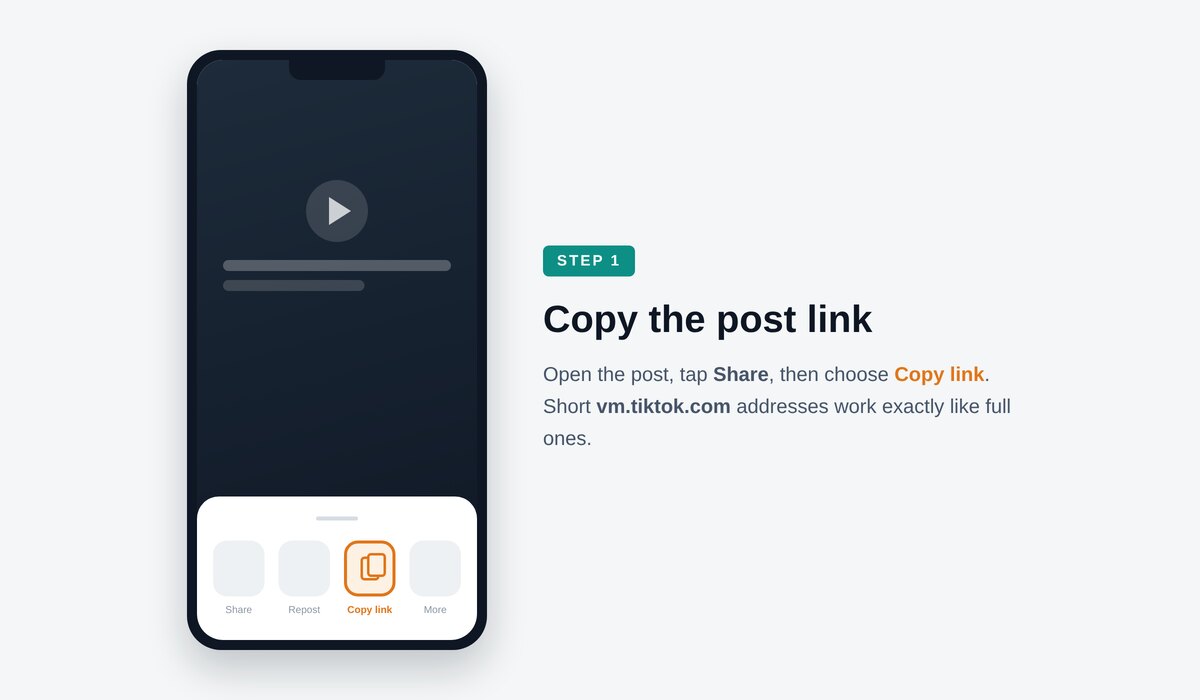
Copy the link
In the TikTok app, tap Share on the post, then Copy link. On the web, the address bar already holds the link you need. Short vm.tiktok.com links work exactly like full tiktok.com/@user/video/… links — SnapTik resolves the redirect for you before it fetches anything.
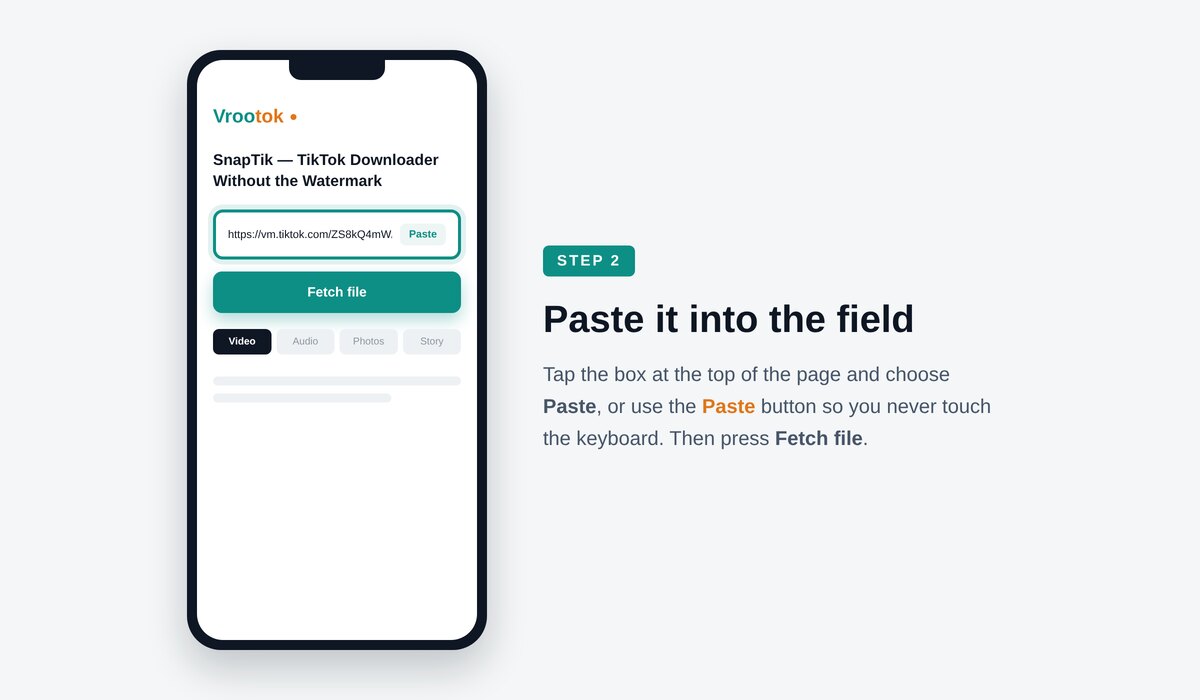
Paste it into the box
Open SnapTik, tap the field at the top of the page and paste. Pick the tab that matches what you want: Video for the clip, Audio for the sound on its own, Photos for a slideshow carousel, or Story for a story post.
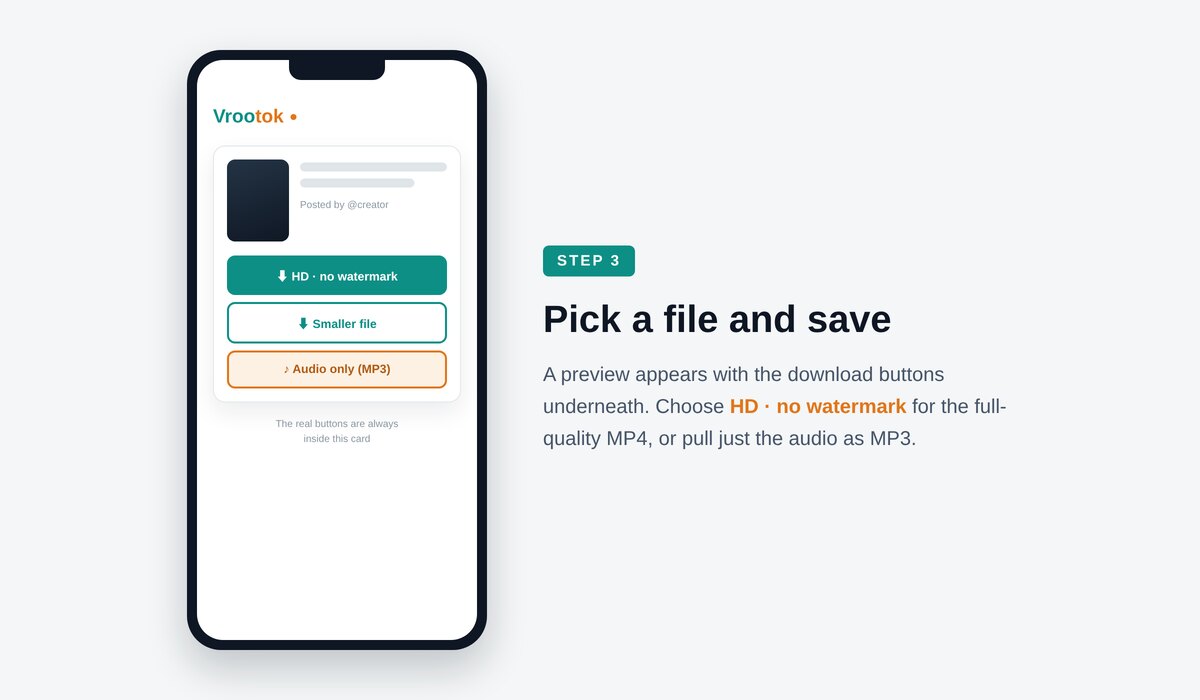
Press Download
You get a list of available files within a second or two. Choose the quality you want and save. On iPhone the file goes to Files and can be moved to Photos with one tap; on Android it goes straight to Downloads or your gallery, depending on your browser settings. That is the whole process. Three steps, roughly fifteen seconds, repeatable as many times as you like. There is no queue, no daily cap and no “upgrade to continue” wall after the third tiktok video download.
Video, audio, photos and stories
Four tabs, one input field. Pick the tab that matches what you want out of the post.
Tab
What you get
File type
Best for
MP4 video
The default and the reason most people arrive here.
MP4
SnapTik returns the published MP4 in the resolutions TikTok is serving for that post — usually 720p and 1080p, sometimes higher for clips shot and uploaded from a recent phone. The file plays anywhere: QuickTime, VLC, Premiere, CapCut, DaVinci Resolve, PowerPoint, or straight back into TikTok if you are stitching something new. Pick the largest size when you intend to edit, and the smaller one when you are just sending it to a friend on a slow connection.
MP3 audio
Switch to the Audio tab and SnapTik extracts the sound as an MP3 instead.
MP3
This is what people want when they are chasing a sound rather than a clip: a voice line, a sample, a remix, a language lesson, a podcast fragment that only ever got posted as a short. The extraction is done from the same source file, so you are not recording playback through a speaker and you are not losing another generation of quality.
Photo carousels
Slideshow posts are a different format under the hood, and screenshotting them costs you resolution and adds interface clutter.
JPG
The Photos tab returns the individual JPGs at the size they were uploaded, so a recipe card stays readable and a product shot stays sharp enough to zoom.
Stories
Story posts expire.
MP4
If a creator you follow posted a tutorial, a discount code or an announcement as a story, the Story tab lets you keep it before the clock runs out. The same no-watermark rule applies.
SnapTik on every device
iPhone and iPad
Safari has handled direct downloads since iOS 13, so no shortcut or third-party app is needed. Copy the TikTok link, open SnapTik in Safari, paste, download, then tap the blue download arrow next to the address bar to find the file in Files → Downloads. From there, Share → Save Video moves it into Photos. If you prefer Chrome on iOS, the steps are the same.
Android
Chrome, Samsung Internet, Firefox and Brave all save directly to your Downloads folder, and most gallery apps index that folder automatically. If the file does not appear in your gallery right away, open your file manager once and the media scanner will pick it up. People who search for a snap tiktok app on Android almost always end up here instead, because a browser page cannot ask for contacts, storage or notification permissions.
Windows, macOS and Linux
On desktop the workflow is even faster: copy the URL from the address bar of the TikTok tab, switch tabs, paste, download. Because desktop browsers have no download size limit to speak of, this is the right machine for grabbing long clips or batches of them before an edit session.
Troubleshooting
Nine times out of ten the clipboard holds extra text — a caption, an emoji, a tracking parameter from a messaging app. Clear the box and paste again, or trim everything after the numeric video ID. Private posts and posts from accounts that have blocked you cannot be fetched by anyone, including SnapTik, because the file is not publicly served.
Usually a connection drop on a large file. Retry on Wi-Fi, or pick the smaller resolution. On iOS, make sure Low Data Mode is off for the network you are on, because it pauses background transfers aggressively.
You are on the Audio tab. Switch back to Video and download again.
On Android the file is in Downloads; open your file manager once to trigger the media scan. On iPhone, open Files → Downloads, then Share → Save Video.
Rare, but it happens when TikTok is mid-rollout on a serving change in your region. Wait a few minutes and try again; SnapTik tracks those changes continuously.
Why the TikTok watermark matters
The tiktok watermark is not a small logo in a corner. It is an animated element that moves between positions every few seconds, which means there is no single safe crop that removes it. Crop one corner and it reappears in the other. Blur it and you leave a smear that every viewer recognises. Stretch the frame and you lose the edges of the shot.
It also carries a cost you cannot see. When TikTok renders the watermarked copy it re-encodes the clip, and that second pass softens fine detail, flattens gradients in dark scenes, and introduces blocking in fast motion. Text overlays get fuzzy edges. Skin tones band. For a dance clip on a phone screen it hardly matters; for anything you intend to re-edit, project, or upload elsewhere, it matters a lot.
SnapTik avoids both problems at once because it never touches the watermarked render. It requests the published file, so what you receive is the bitrate the creator uploaded, with no second encode and no badge to crop around. This is the single most common reason people switch from the in-app save button to a tiktok video downloader.
Copy the link.Paste it into the box.Press Download.
Quality, file sizes and what to expect
TikTok serves different renditions depending on how the clip was shot, how it was uploaded and which region requests it. SnapTik shows you what is actually available for that post rather than promising a resolution it cannot deliver. A 1080p upload comes back as 1080p. A clip that was filmed at 720p and uploaded over a weak connection comes back at 720p, because the higher-resolution file simply does not exist on TikTok's servers — no downloader anywhere can invent detail that was never uploaded.
As a rough guide, a fifteen-second clip at 1080p is typically 3–6 MB, a one-minute clip 15–30 MB, and a ten-minute long-form post 150–300 MB. MP3 audio is usually under 1 MB per minute. There is no file size cap on the SnapTik side, so long posts are fine; the practical limit is your own connection.
If a download looks softer than the original, check which option you selected: the list is ordered with the largest file first, and it is easy to tap the second entry by accident on a small screen.
Privacy: what SnapTik keeps
Nothing. The link you paste is used to locate the file and then discarded. There is no account, so there is nothing to tie a download to a person, and there is no library of “your downloads” stored on a server somewhere waiting to be breached. The transfer happens, the page forgets.
Because SnapTik runs in a normal browser tab, it also cannot see your camera roll, your contacts or your clipboard outside the moment you paste into the box. That is a meaningful difference from an installed snap tiktok app, which has to request device permissions before it can do anything at all, and which keeps those permissions long after you stop using it.
The creator whose post you download is never notified, because SnapTik requests the file the same way any viewer's browser does. No notification, no follow, no view-count side effect beyond the one your own viewing already produced.
SnapTik compared with the other ways to save a TikTok
There are four common routes to getting a TikTok onto your device, and they are not equivalent. The in-app save button is the fastest but gives you the watermarked, re-encoded copy. Screen recording gives you whatever your screen showed, including notification banners, a lower frame rate and the interface sitting on top of the video. An installed tiktok video downloader works, but it wants storage permissions, pushes notifications, and tends to fill the result screen with ads. SnapTik is the fourth route: a plain web page that fetches the published file and hands it over.
The practical difference shows up the moment you try to do something with the file. Re-posting a screen recording to Reels looks exactly like what it is. Editing around a bouncing badge eats time on every cut. Trusting an installed app with permanent storage access is a decision you have to keep making. Pasting a link into SnapTik is a decision you make once, for fifteen seconds, and then forget.
A closer look at how SnapTik fetches a file
It helps to know what actually happens after you press the button, because it explains why the result is different from the one the app gives you. Every public TikTok post is stored on a content delivery network as a set of renditions: a few video files at different resolutions and bitrates, one audio track, and a thumbnail. When somebody scrolls past the post, the app picks whichever rendition suits their connection. When SnapTik resolves your link, it asks that same network for the list of renditions and shows them to you directly, which is why the download starts almost immediately and why the file you get is byte-for-byte the published upload rather than a freshly generated copy.
The watermarked version is a separate product. It is generated only when a viewer taps save inside the app, and generating it means decoding the original, painting the moving username and logo on top, and encoding the whole thing again. That extra pass is where the softness, the banding and the blocky motion come from. SnapTik never requests that version, so none of those losses enter the picture. This is also why SnapTik finishes faster than the in-app save on a slow connection: there is no render step waiting in a queue somewhere, only a transfer.
The search terms people use for this
People describe the same task in a dozen ways, and all of them end at the same box. Snap tiktok, snap tik and snap tick are simply how the name gets typed on a phone keyboard in a hurry. Tiktok downloader and tiktok video downloader describe the tool. Download video tiktok and tiktok video download describe the action. Tiktok watermark describes the problem. SnapTik answers all of them with one page and one paste field, which is why it is worth bookmarking rather than re-searching every time.
If you reached SnapTik by typing any of those into a search bar, you are already done looking. Scroll back to the top, paste your link, pick Video, Audio or Photos, and press Download. The file will be clean, full quality, and yours in about fifteen seconds — which is the only promise SnapTik makes and the only one that matters.
What people actually use it for
Keeping your own work. Creators lose access to accounts, posts get removed on appeal, phones die. Downloading your own uploads as clean MP4s is the cheapest archive there is.
Cross-posting. Reels, Shorts and Stories all penalise visible watermarks from other platforms. A clean file re-posts without the reach penalty.
Editing. Stitches, duets, compilations and reaction videos all start with a clean source. Editing around a moving badge is painful and looks amateur.
Offline viewing. Flights, commutes, patchy rural data, metered roaming plans — saved clips play without a connection.
Teaching and training. Teachers drop short clips into slides; trainers build technique reels; language students collect native-speaker audio.
Research and reporting. Journalists and analysts need the original file, with its original quality, before a post disappears.
Habits that make this faster
The creator archive — Once a month, open SnapTik on a desktop and save every post you published that month as a clean MP4, named YYYY-MM-DD-topic.mp4, into one folder backed up to cloud storage. It takes ten minutes and it means an account suspension, a lost phone or a mistaken takedown never costs you your back catalogue. Creators who have been through a ban appeal usually start doing this the same week.
The cross-post pipeline — Film in TikTok, publish there first, then use SnapTik to pull the clean file and upload it to Reels, Shorts and Pinterest the next morning. A clean source avoids the visible-watermark penalty those platforms apply, and because there is no second re-encode the clip still looks sharp after each platform compresses it again on upload.
The reference folder — Editors, dancers, chefs and language learners all do a version of the same thing: collect twenty clips that demonstrate one technique, keep them offline, and study them frame by frame. Downloading the audio separately with SnapTik is useful here too — a loop of a phrase or a beat is easier to study without the picture.
Search traffic for snap tiktok app is enormous, but when people land on a page that just works in the browser, almost nobody goes looking for an installer afterwards. The app was never the goal; the file was. SnapTik removes the step in between. Nothing to update, nothing to uninstall later, nothing sitting in the background between uses, and the same experience on a borrowed laptop as on your own phone.
One practical consequence is worth remembering. Because SnapTik hands you exactly what was published, the quality ceiling is set at upload time, not at download time. If you want your own posts to come back at the highest possible quality later, upload them over Wi-Fi, export at 1080p or higher from your editor, and avoid re-uploading a clip that has already been compressed by another app. Do that, and every future SnapTik download of your own catalogue will be as sharp as the master you exported.
TikTok serves regionally, and the renditions available in one country are not always identical to another. Two people can paste the same URL into SnapTik an hour apart and see slightly different file sizes. Nothing is broken when this happens; you are simply being served by a different edge node with a different cache. If the largest option looks unusually small, wait a few minutes and paste the link again, and the higher rendition will often have propagated by then.
Whatever the reason, the rule underneath is the same: ask permission or stay inside personal use. SnapTik is a tool for moving a file, not a licence to republish someone else's work as your own. Credit the creator, respect takedown requests, and do not monetise material you did not make.
Notes for creators who post every day
If posting is part of your routine rather than a hobby, treat SnapTik as part of your production pipeline rather than a one-off rescue tool. Three habits make the biggest difference. First, download each post the same day you publish it, while it is still fresh in your head and easy to label. Second, keep one flat folder per month instead of a deep tree, because a flat folder is searchable and a deep tree is not. Third, store the clean MP4 next to the caption you used, so that when a video performs well you can rebuild the whole post elsewhere without guessing.
Teams working with a brand have an extra reason to keep clean files. Agencies, sponsors and marketplaces usually reject footage carrying another platform's branding, and asking a creator to re-export three months later is slow and sometimes impossible. A shared drive of watermark-free masters pulled with SnapTik removes that friction entirely, and it costs nothing but the few seconds it takes to paste a link.
Yes. No account, no trial, no credit card, no per-day limit on how many times you download video TikTok posts.
No. There is no extension and no snap tiktok app. Everything runs in the browser tab you already have open.
It never adds one. SnapTik fetches the file as published rather than the watermarked render TikTok produces for the in-app save button, so there is nothing to remove.
Yes — the Audio tab returns an MP3 extracted from the same source file.
No. If a post is not publicly viewable, the file is not publicly served, and no tool can reach it.
No notification is sent. The request looks like any ordinary view.
Downloading for personal, offline use is normal almost everywhere. Republishing someone else's video as your own, or using it commercially without permission, is not. The responsibility sits with the person pressing the button.
Yes. There is no file size cap, so ten-minute and longer posts download fine.
Because that is the size TikTok is serving for that post. A downloader can only hand you what exists.
No. Paste, download, repeat.
The short version
SnapTik turns a TikTok link into a clean file in about fifteen seconds. No watermark, no re-encode, no sign-up, no install, nothing stored. Whether you came here searching for snap tiktok, snap tik, snap tick, a tiktok downloader, or simply a faster way to do a tiktok video download, the answer is the same box at the top of this page. Paste a link and press Download.